Follow these steps to complete this important requirement in your transition to MSU Texas. Please be sure to double check the information you submit.
STEP 1: Complete the Pre-Assessment Activity on the Accuplacer webpage. You will need to create a student account in order to do the Pre-Assessment activity. When prompted to “Choose a Practice Test,” select “Texas Success Initiative 2.0 Pre-Assessment Activity (TSIA2 – PAA).” You must complete the entire Pre-Assessment Activity regardless of the sections of the test you intend to take. Ready to get started? Go to https://practice.accuplacer.org/login. Please email tsi.domestic@msutexas.edu once you complete the Pre-Assessment Activity.
TIPS: We recommend using Google Chrome for the Pre-Assessment. Be sure to save the completion certificate you receive, but do not send us the certificate or results directly. Select Midwestern State University as the institution. 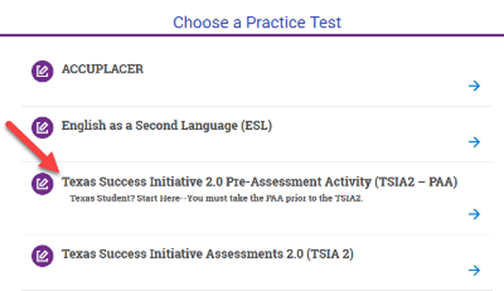
STEP 2: Complete the TSIA2 Registration Form. Be prepared to enter your Mustangs ID and date of birth for identification purposes. You should also know which sections of the TSI you are required to take; you can quickly check your TSI status on Banner Self-Service by viewing your holds. [TIP: Current MSU students and newly admitted students can get to Banner Self-Service through the MSU Portal. Login and then on the left side under QuickLaunch Navigation, click on Student Records, then View Holds.] Click here to register for the TSIA2.
TSI2 Testing Fees. The cost of testing depends on which section(s) of the assessment you're taking.
- ELAR (Reading & Writing) - $20
- Math only - $10
- ELAR & MATH - $29
- Meazure Learning Remote Fee - $28 (paid directly to Meazure Learning)
- Optional - On-demand, take it now (<24hr) - $8
- Optional - On-demand, take it soon (>24hr<72hr) - $5
STEP 3: Payment instructions. If you did not pay at the time of registration, the link below will take you to the Touchnet payment system.
- On the payment page, leave the "1" in the Quantity box, unless you are paying for more than one student. Click "Add to Cart."
- Select the option for which TSIA2 section(s) you will take and add your FULL name -- first and last.
- Finally, click Check Out to make your payment with a credit card or electronic check (ACH)!
Click here to pay MSU Texas via Touchnet.
If you have any questions or need assistance, email tsi.domestic@msutexas.edu.
Taking the TSI Assessment (TSIA2) during the week prior to the start of the semester, may require late registration and/or schedule changes. There is no guarantee that you will be allowed to add additional courses once the designated registration dates have passed. Please check with the Registrar's Office if you have questions.